Work areas on the map, results from the field
For the metropolitan municipality of Mersin we delivered a web and mobile solution that plans field tasks around a work area drawn on the map, assigns them to people or teams, and brings them back to the office with photo, description and approval.
The task
Field work in a municipality brings together different teams, work areas and operational details. Beach cleaning, street sweeping, container cleaning and green-space care each need different information. In every case it has to be clear where the work happens, who is responsible for it and how it ends.
With some 500 field staff, following up an assigned task matters as much as assigning it. The plan made in the office has to be understood in the field — and the work done in the field has to become a record the office can assess.
Four questions sum up the need:
- In which area will which work be carried out?
- Which person or team is the task assigned to?
- Has the work started, is it running, is it finished?
- Which notes and photographs were recorded with the result?
Planned in the office, continued in the field on the same record
Office teams create tasks in the web application, define the work area on the map and choose the responsible staff. In the field the same task is opened, started and completed. Location, owners, dates, office description and field result stay parts of one task.
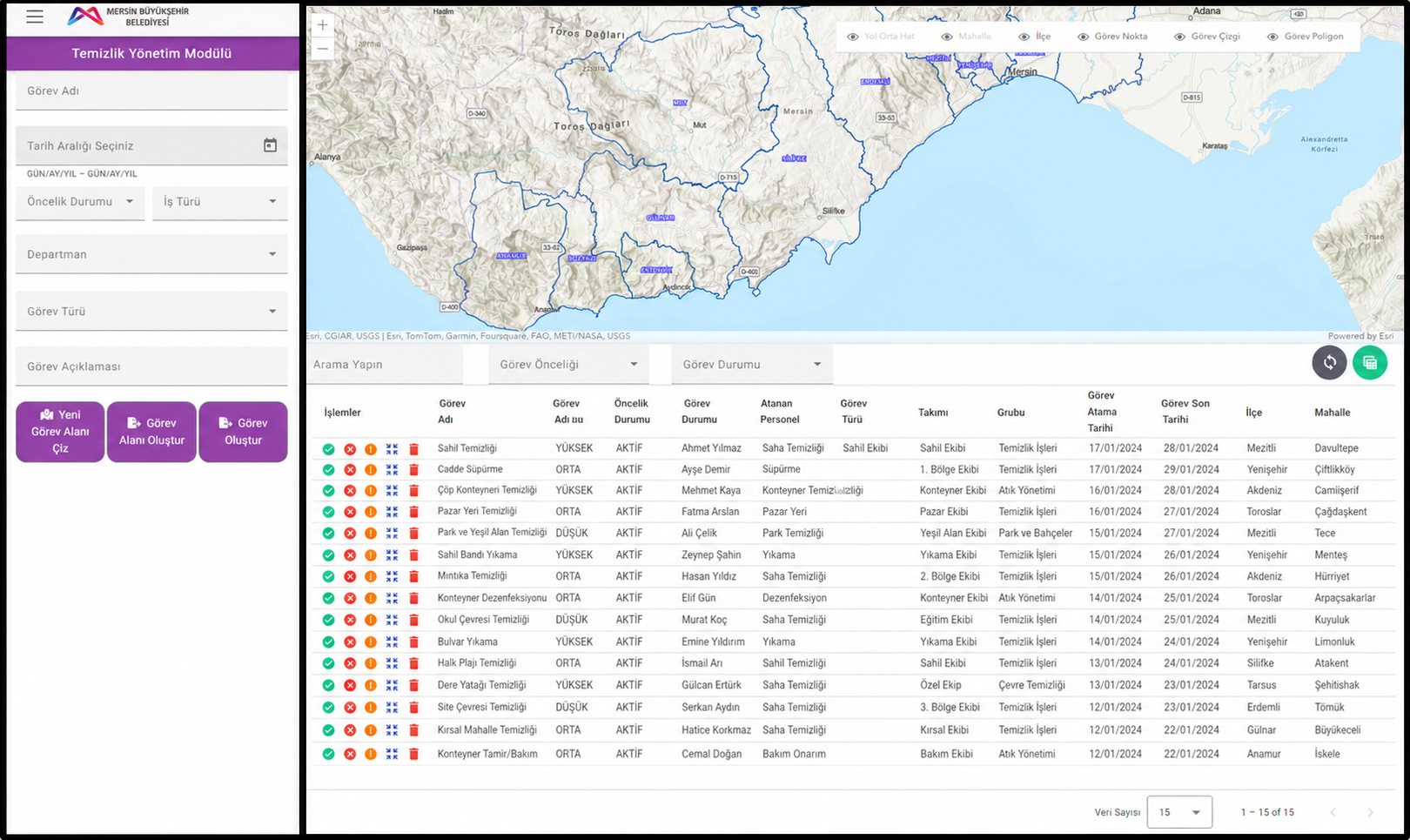
The interface is in Turkish — the language of the people using it at the customer. DAG-Flow itself appears in German, Turkish or English.
Work area drawn on the map
Coordinators draw the area on the map. That defines where the work will happen, along with the description of the task.
Assignment to a person or a team
Tasks go to one individual, or to staff selected through the department, team and group structure.
Planning with dates and priority
Assignment date, deadline, type of work and priority belong to the task. The person in the field sees the work with exactly those details.
Following the task in the field
A task can be started, paused and resumed on mobile. Start and end times accompany the record of the work.
Photo and field description
Notes and photographs are added to the task record. The office plan and the field result can be reviewed side by side.
Approval stage after completion
A task finished in the field moves to “awaiting approval”. Finishing the work and approving the record stay separate steps.
Reports from task records
The task tables in the web application export to Excel. What was collected during operations is available again for reporting.
Querying by geometry
Tasks can be queried by point, line or area — depending on how the work area was defined.
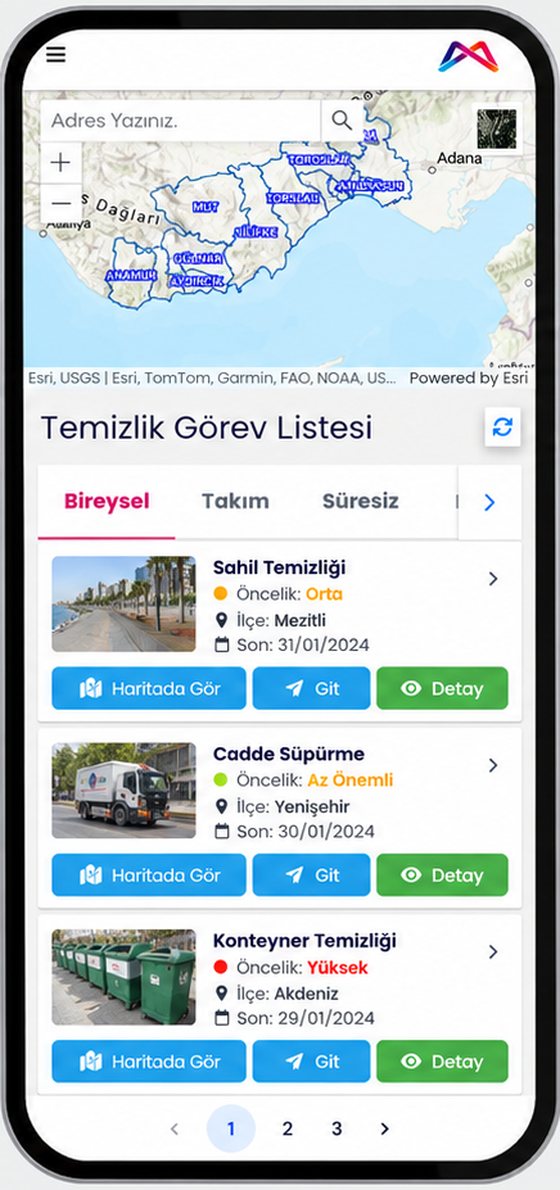
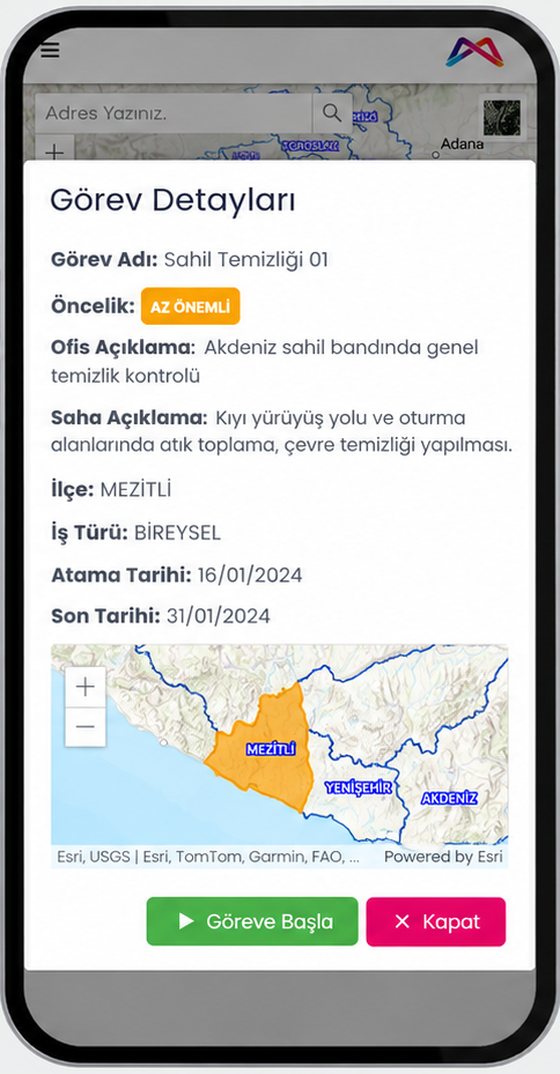
The running operation on one screen
Coordination sees not only individual tasks but the state of the whole operation: how many tasks are running, how many have started, how they split across points, roads and areas, and where the priorities sit.
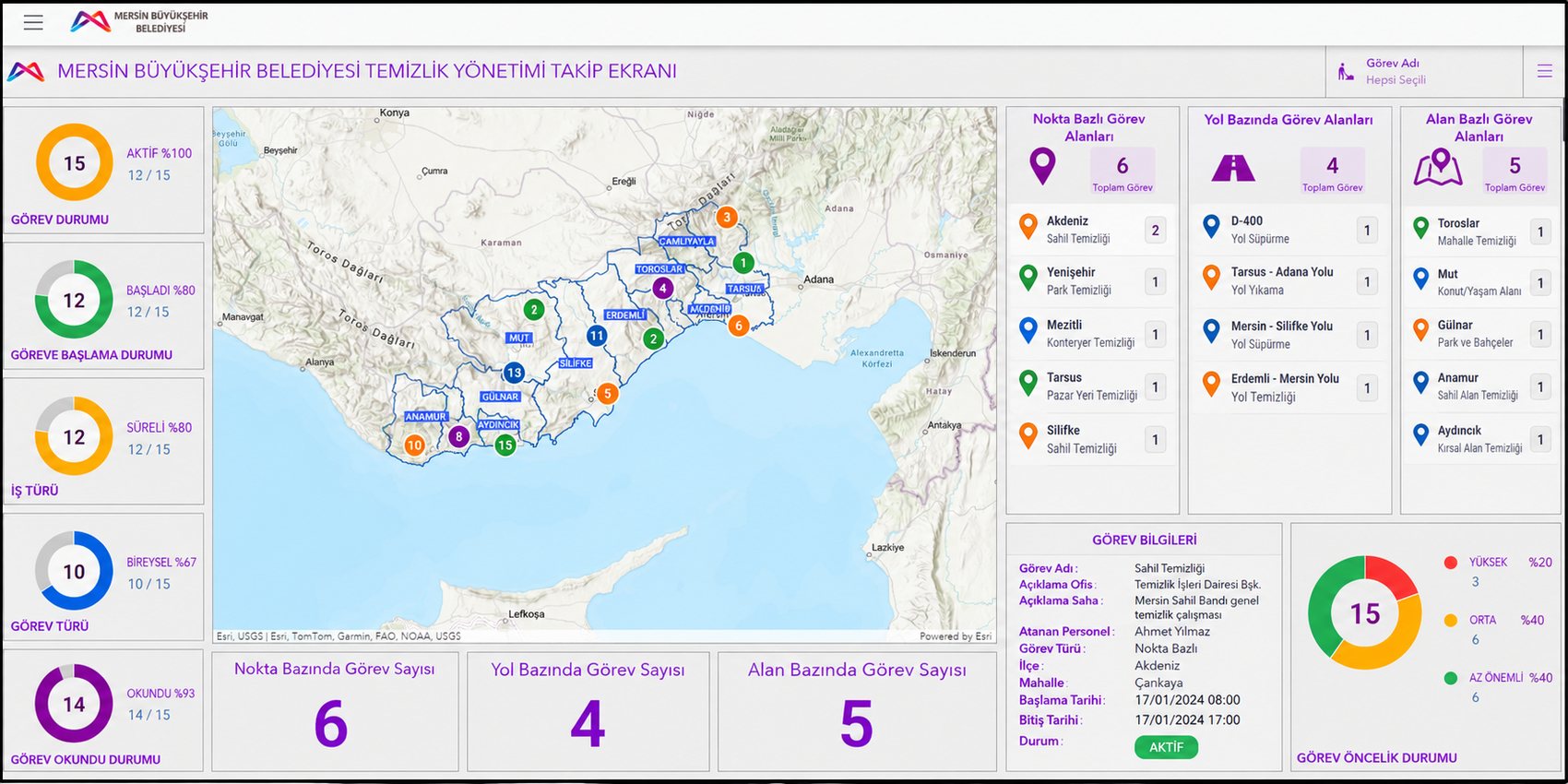
Status at a glance
Active tasks, started work, time-limited tasks and read assignments as a share of the total.
Distribution across the city
Tasks are located on the map and broken down by district as well.
Point, road, area
Tasks are counted and listed separately by the shape of their work area.
Priority distribution
High, medium and low priority tasks in relation to one another.
From work area to result record
The following flow describes how a task is built in the application. It does not represent a single documented field case.
Define the work and the area
The office sets the task name, description, dates and priority, and draws the work area on the map.
Choose who is responsible
The task goes to an individual, or to staff within a selected team and group.
Carry out and record in the field
The task is opened and started on mobile. Field description and photographs are added; the work can be paused and resumed.
Send for approval and report
Once finished, the record awaits approval. The office sees the task details and the field result and can export the records.
How this project relates to DAG-Flow
Mersin is a customer project that helped lay the foundation for the development of DAG-Flow. It is where we learned how different types of work, each with their own forms, can run through one shared process — from street sweeping to container cleaning, the same mechanics with different fields. That experience is what sits inside DAG-Flow today.
This is not an installation of DAG-Flow. The solution delivered in Mersin is built around the field operations of a metropolitan municipality. A company adopting DAG-Flow today receives a separate product for commercial cleaning, security services and staffing providers.
Where these figures come from
Scope: The figure of some 500 field staff comes from the project owner. It is not based on a measurement of active sign-ins.
Functionality: The processes described come from the project documentation and from the interfaces of the delivered system.
Screenshots: The interfaces shown come from the delivered system. The tasks, names and dates in them are a prepared sample data set, not personal data of employees.
Award: details to follow.
Not measured: No figures are available on time saved, cost reduction or changes in service quality. We make such claims only once they are documented.
Field operations with several types of work?
If different jobs in your organisation each need their own details but should share one process, we are glad to talk about it.
- info@dagtech.de
- Phone
- +49 160 225 4395